Pay in installments of $6.29 with
 ,
,
 and
and

Shipping Estimate
USA
- USA
- CAN
- USA
- CAN
Ships within 48 hours · Estimated delivery Jul 21 - Jul 26
 Promo Codes Available:
For Your Every Summer RSVP, with Code: SUMMER15
Description
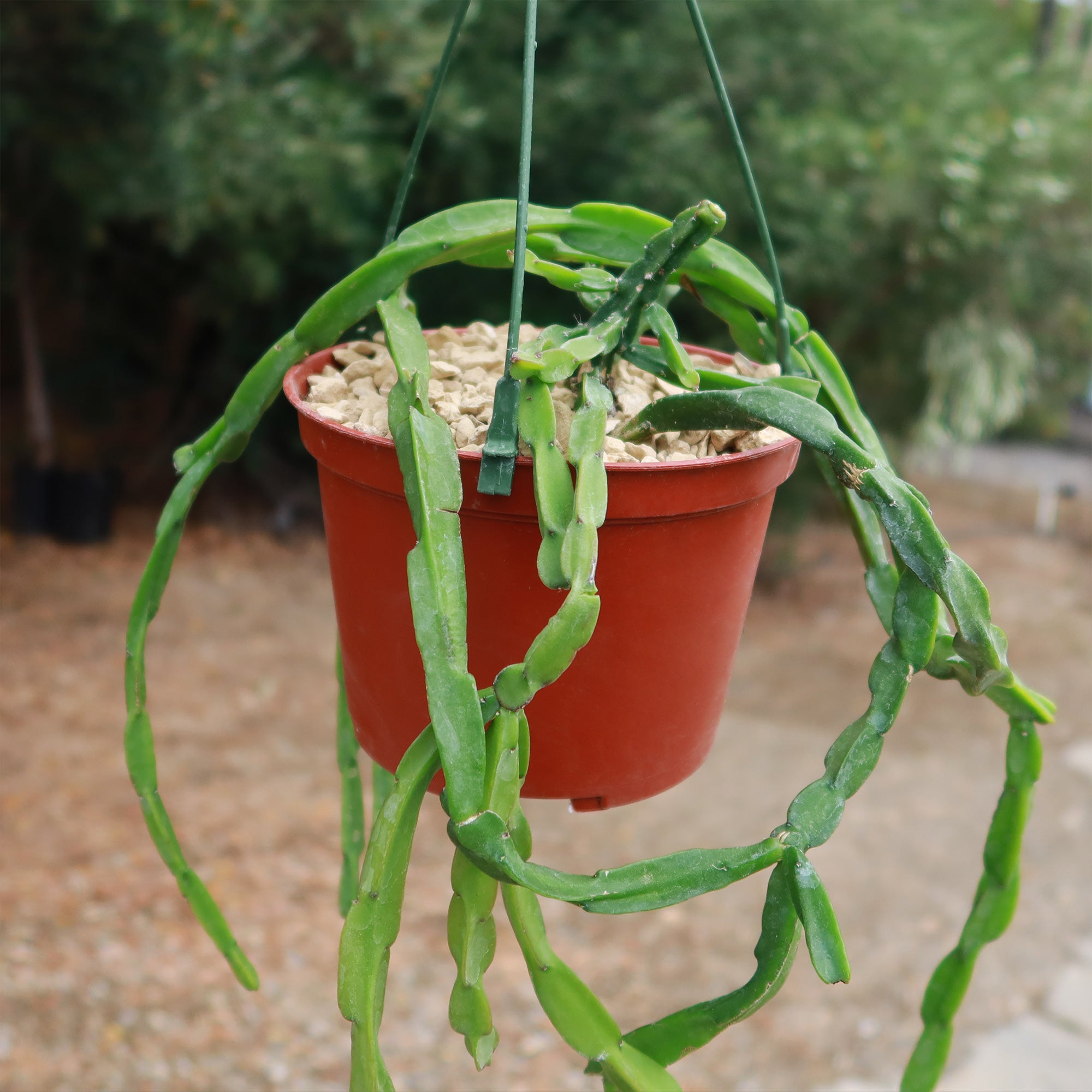
hanging plants cactus Chain Cactus 'Rhipsalis paradoxa'The stunning 'Rhipsalis paradoxa', is a vibrant member of the RhipsalisGo to search results page genus also known as Chain cactus and link cactus. This fascinating trailing Rhipsalis is known for its chain like leaves that appear as if they're connected together, giving it a truly one of a kind appearance. But don't be fooled by its unusual looks this cactus definitely belongs to the Cactaceae family despite lacking thorns in most of its internodes.
The stunning 'Rhipsalis paradoxa', is a vibrant member of the RhipsalisGo to search-results-page genus - also known as Chain cactus and link cactus. This fascinating trailing Rhipsalis is known for its chain-like leaves that appear as if they're connected together, giving it a truly one-of-a-kind appearance. But don't be fooled by its unusual looks - this cactus definitely belongs to the Cactaceae family despite lacking thorns in most of its internodes.
With a height of 12 inches and a width of 6 inches, this plant from Brazil is sure to turn heads and add drama to any space. But don't be intimidated by its bold appearance - this Rhipsalis variety is easy to care for and can thrive in a variety of environments.
The unique feature of the chained cactus is its 3-lobed stem, which is divided into flattened elements growing on top of each other and creating elongated stems perfect for hanging pots in balconies or office rooms. And with shallow roots designed to anchor the plant to trees, this chain cactus spreads horizontally in all directions rather than deepening below ground level.
Small white flowers are produced along the branches of the Rhipsalis paradoxa from late winter to early spring. It also yields red fruits that are not edible. It is always best to err on the side of caution and keep away from the children and pets.
Keep reading to learn more about this stunning Rhipsalis paradoxa and how you can incorporate it into your own home or garden.
Watering Needs
The most important thing to remember when caring for Rhipsalis paradoxa cactus is to make sure it doesn't get overwatered. As overwatering can lead to root rot and damage to the plant.
Watering this chain cactus should be done typically like other cacti, allowing the soil to almost completely dry out between waterings. During the summer, you should water your cacti once or twice a month when the soil is dry to the touch, about 1-2 inches deep. During the winter, you probably do not need to water them at all.
It is also important to use well-draining soil and a pot with good drainage to prevent water from accumulating in the soil.
Light Requirements
Providing enough light for these desert cacti is one of the most important aspects of their care. It is important to grow Rhipsalis paradoxa in areas that receive at least 4-6 hours of bright, indirect light every day to keep them happy. Avoid direct sunlight, as it can burn the leaves of this trailing Rhipsalis.
If indoors, place your cactus directly in front of a west- or south-facing window with filtered light in a bright, shaded area. If they don't receive enough light, their stems may grow leggy and become paler, and their spines will shorten, so make your cactus happy and give it plenty of light.
Optimal Soil & Fertilizer Needs
When it comes to choosing the right soil and fertilizers for your adorable cacti, you need to be extra cautious and need to use the right kind of soil. In order to grow a cactus successfully, the soil must be fast-draining. Poor drainage soil, even if watered properly, could damage the roots.
So, in this way, moisture can be a real killer, leading to root and stem rot in no time flat. But fear not, my fellow green thumbs! Planet Desert has got your back with our specialized cactus potting mix that includes organic mycorrhizae – perfect for promoting healthy roots and happy plants.
When it comes to fertilizing your chain cactus, it only needs a small amount of fertilizer applied once a year in spring. Cacti prefer a fertilizer with lower doses of NPK, with a maximum ratio of 5-10-5 that is higher in phosphorus than nitrogen.
Hardiness Zones & More
As desert dwellers, the Rhipsalis chain cactus enjoys hot temperatures. They prefer constant temperatures between 65 to 75 degrees Fahrenheit and can tolerate triple digits in the summer, so don't worry if your cactus gets too hot.
This cactus, on the other hand, cannot handle frost, cold, or freezing temperatures, so make sure it doesn't get below 45 F in its environment. If grown outdoors, this cactus grows best in USDA zones 10 -11.
However, it can be grown indoors year-round in any location. This is because indoor environments typically provide consistent temperatures that are within the preferred range for this cactus and protect the plant from sudden shocks by temperature fluctuations.
We think you will love this Rhipsalis paradoxa – order your very own chain trailing cacti today and start enjoying its beauty in no time!
Shipping Notes
- Free Standard Shipping on $100+ Orders to the USA.
- Except Preorder products are shipped in 48 hours.
- Delivery to the USA:
- Standard Shipping : 3-10 business days
- If time is of the essence, please consider selecting expedited delivery for faster service.
Exchange/Return Notes
- We offer a 30-day return/exchange service after receiving.
- Final sale items are not eligible for returns or exchanges.
- To process your return/exchange, please contact us at [email protected]
- Please click here for more details>>> Return & Exchange Policy